
Today we speak about Godot XR and its Godot XR Toolkit (or the new Godot XR development kit).
It will be a bit dry and technical, but it is important to understand how our approach works. I promise the next post will be more fun!
These kits implement a lot of interaction and controls in XR/VR space by including grab, touch, hover, pose, movement, teleport, gaze, UI interaction elements, and more. On top of it, devices and own vendor toolkits are also integradeable by installing an additional addon godot open xr vendors. So with the toolkit and the vendor plugins, the whole XR/VR features are usable inside Godot, without writing too much gd-script/code yourself.
Currently, there are no up-to-date C#-based libraries that enable these features of XR inside Godot. There is a library called godot-nxr, which is unfortunately not actively maintained any more. We want to use such a toolkit because a lot of code and logic is already existing. With Godot XR Tools, we have to think a bit differently because of the gd script layer.
The idea is to hook on godot-xr-tools without rewriting it in C#. TinkerFlow talks to it through Godot-based connections over signals. If the interest is high enough and or the Godot XR development kit will change the structure, we might consider more development there.
TinkerFlow addons structure#
Our XR addon package will include all XR-based features of TinkerFlow. This is according to the idea to keep every extended feature, obviously like the XR functionality, as one separate addon. In our vision, each use case will be a combination of TinkerFlow addons and Godot addons. Using addons this way, the not used code is reduced, and we keep the codebase for us structured.
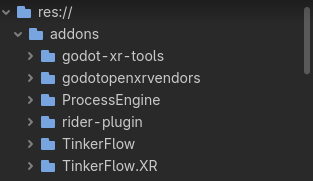
The XR addon of TinkerFlow is called TinkerFlow.XR. No GDScript subclass and no patch to Godot tool files (yey!).
The bridge to connect C# with GD-Script#
TinkerFlow.XR converts the GD based signals into typed C# events. New XR-Conditions read the events then over properties. With this, the event flow has three steps, jumping over three layers.
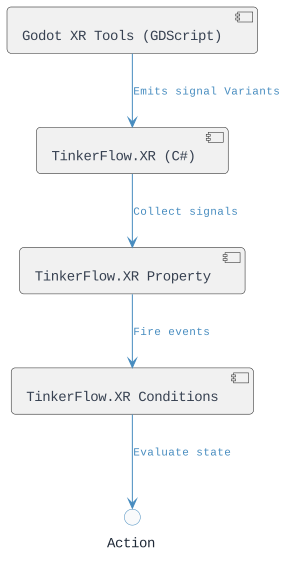
We support all basic Godot XR tools interactions, and with this the OpenXR-based standard interactions. That means we support Grab an object, use an object, poke an object, touch an object, highlight an object, snap an object to another object, teleport to an object (point).
| TinkerFlow concept | godot-xr-tools node | Wrapped by over |
|---|---|---|
| Grab | XRToolsPickable | XRToolsPickableAdapter |
| Use (action button) | XRToolsPickable | XRToolsPickableAdapter |
| Highlight | XRToolsPickable | XRToolsPickableAdapter |
| Snap object | XRToolsPickable | XRToolsPickableAdapter |
| Poke | any node with a pointer_event signal, typically XRToolsInteractableBody | XRToolsPokeTargetAdapter |
| Touch | same as poke | XRToolsPokeTargetAdapter |
| Teleport point | XRToolsTeleportArea | XRToolsTeleportAreaAdapter |
Like explained in the previous post about properties, every interaction property is a Godot Node placed under a ProcessSceneObject.
The ProcessSceneObject is placed under the node that carries the godot-xr-tools gd script.
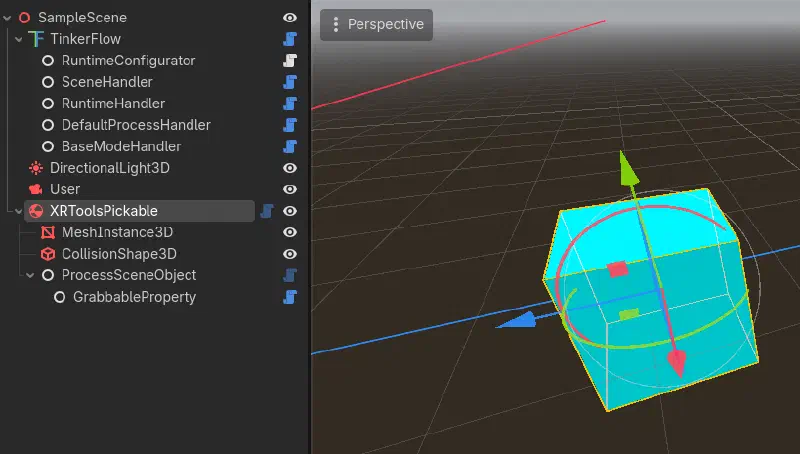
ProcessSceneObject and the GrabbableProperty as the connection to the processThe result is that each adapter lookup uses GetParent()?.GetParent() or ProcessScenObject.GameObject() to get the original GD object with its signals.
That expression returns the interactable node for any property that follows the hierarchy above.
All property classes in this bridge use that exact lookup.
Inside the Process Inspector the Pickable Object can just be dragged into the SceneReference field of the GrabbedObject-Condition.
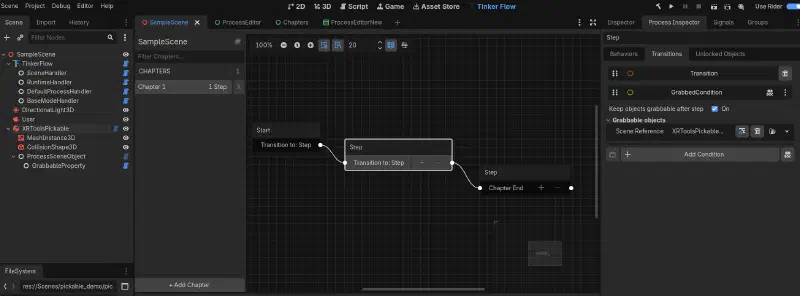
ProcessSceneObject and the GrabbableProperty as the connection to the processIf the hierarchy is wrong, the property logs an error in _Ready and does not connect to an adapter.
Code patterns you need#
The adapters are small plain C# classes that wrap one GDScript node. It is not a Godot node, has no scene tree presence, and contains no TinkerFlow property logic.
C# cannot name GDScript classes at compile time, so the adapter centralizes string names in one place (if they need to be changed).
Signal connection in Godot C# requires a Callable that stays alive. The adapter stores the Callable fields so later disconnects use the same delegate instances.
Adapters can be reused, so the XRToolsPickableAdapter is used by the grabbable, usable, snappable, and highlight properties at the same time.
Adapters keep gameplay decisions out of interop code. XRToolsPickableAdapter reports that a grab happened. GrabbableProperty decides that a snap-zone grab should not count as a user grab.
Additionally, there are validity checks only at runtime.
- Each adapter exposes
IsValid. - Every method checks
IsValidbefore calling into Godot ConnectAllandDisconnectAllare idempotent because of the privatesignalsConnectedflagDisconnectAllalso checksIsConnected(signal, callable)before callingDisconnect
So, owning property logs the editor hierarchy error, and the subscription stays one line. Signals arrive untyped, so the handler uses loose types and converts inside.
The whole property-based bridge structure looks like this:
[Signal]
public delegate void GrabStartedEventHandler(GrabbablePropertyEventArgs args);

public event Action<GrabbablePropertyEventArgs> GrabStartedAction;
Our approach comes with hard limitations, which can only be addressed by implementing the whole XR interaction system ourselves…
Signal and Event Priorities#
The current hardest limit is the priority. There is no priority system and no “one interaction at a time” rule. Each property subscribes to its own godot-xr-tools signals and keeps its own boolean. No property reads another property’s state.
Conditions poll independently, once per frame (not the TinkerFlow process update!). Several conditions can be complete in the same frame when their states are compatible, so the first conditions at the process wins! The only exclusivity is inside the GDScript pickable: one primary grabber and one secondary grabber (like one-handed and two-handed objects). (If there is a need for that, we could implement a two-handed grabber condition as well.)
What does that mean to combined conditions?
- Grab with use is possible over the
action(), but is delivered only while the pickup holds the object (UsablePropertydoes not checkIsGrabbed). - Touch with poke as well, the
pointer_eventtriggeresENTEREDthenPRESSEDand Touch ends atEXITED, poke atRELEASED. - Touch and grab also, but there is no cross-check on the Godot layer side.
- Snap and release are possible, so a snapped object is not “grabbed”, so both conditions are true then.
- Grab with snap not, becasue
GrabbablePropertyignores grabs whosebyis a snap zone. A snapped pickable refuses a direct hand grab because the zone has nopickupfunction.
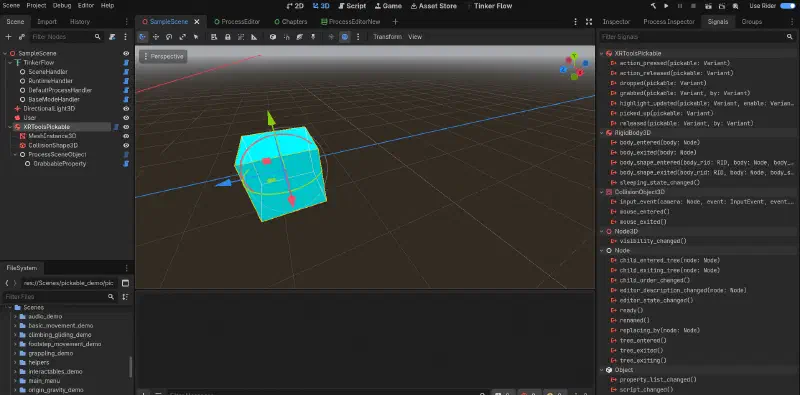
Current Limits or problems#
Additional limits are the Variant bridge has no compiler help. And more importantly, none of them causes a compiler error. Testing is an important topic here as well.
Another limits are FastForwardTeleport() emits TeleportEnded and arms the property down.
It does not move the user, because godot-xr-tools has no queued teleport request API comparable to Unity’s TeleportationProvider.
Here we need more feedback for the actual requested behavior.
The color is for highlighting in HighlightPropertyEventArgs is only saved there, and the visuals come from XRToolsHighlight nodes, which are boolean.
So, HighlightProperty also does not inherit LockableProperty, unlike the other interaction properties (so it cannot be locked).
Separately, BaseHighlightProperty redeclares public ISceneObject SceneObject { get; } and never assigns it.
CurrentPokeDepth is true while poked and false otherwise, so there is no analog press value (like how much force or deep was poked).
We noticed a potential bug of Godot XR tools on poke end, it can signal twice sometimes by EXITED invokes both PointerExited and PokeEnded, while RELEASED already invoked PokeEnded.
The properties ignore the duplicate because the state guard rejects it for now (we add a todo for later correction).
Snap. SnapZoneProperty.Configure(IMode) does nothing at the moment.
It exists only to satisfy ISnapZoneProperty, because godot-xr-tools expose no hover mesh or highlight material options to configure (as in Unity).
With LockOnUnsnap = true, an unsnap calls RequestLocked(false) and then RequestLocked(true), so the zone ends locked unless IsAlwaysUnlocked is true.
SnappableProperty.InternalSetLocked is empty, so locking a snappable property has no effect, use LockObjectOnSnap or lock the snap zone instead.
The Snap Zone state can also diverge from the object state, so snap_zone.gd sets picked_up_object and emits has_picked_up before pick_up can refuse, so a forced or initial snap of a locked or held object leaves SnapZoneProperty.IsObjectSnapped true while SnappableProperty.IsSnapped is false.
UsableProperty listens only to action_pressed and action_released.
If the trigger is still held when the object drops, the pickup no longer has picked_up_object and never sends action_release, so IsBeingUsed stays true until the next press and release cycle.
A pickable that starts held, a snap zone that starts occupied, or a user that starts inside a teleport area all, assumes the default property state until the next signal. (There is no initial state seed.)
The biggest risk or limitation is that the bridge relies on exact GDScript signal names. A renamed signal in a future godot-xr-tools version breaks the whole connection silently at runtime. We hope new the new Godot XR development kit fixes this for usable GDExtension APIs like other parts of C# Godot.
As I see you get though all the technical details, so thanks for reading it and see you next time.