
Today we are talking about processes, serialization, import, and export.
Inside VRBuilder itself, all process information is packed into a JSON.
(The Steps, Behaviors, Conditions, Transitions and Chapters, at Structure of VR Builder are explaining this structure more)
So, the logic of the process is build inside Unity, and that structure gets saved as a JSON file with additional metadata.
So data that is not needed for actually executing the process, but for saving the position of a Step inside a Chapter as a visual element in the graph, plus the GUID of each Entity.
(An Entity here can be a Chapter, Step, Transition, Behavior, or Condition, along with a runtime variable called $ID.)
The current Situation#
And this basically ends up with one huge JSON file that is logically structured data. It is practically unreadable by humans, which sort of defeats the purpose of the JSON format in the first place, to be somewhat human-readable and understandable but also for machines.
To be more technical here, VRBuilder currently stores also types directly.
A $type field that holds the namespace and AssemblyQualifiedName so the system can figure out which C# class to map from the JSON structure.
That is a problem if other targets that should load or save like in TinkerFlow, because some namespaces that exist in Unity simply do not exist inside Godot.
We hit the same AssemblyQualifiedName trap before when RuntimeConfigurator stored DefaultRuntimeConfiguration as a string, as detailed in The Journey from Singletons to ServiceRegistry.
So we could build an importer by filtering out namespaces with regex and mapping them to the right classes, but then we could not export from TinkerFlow at all.
Our first approach was throwing away the namespace, the runtime variable, and the (part) type information, then building a mapping between the behavior in the process JSON and its implementation in the target engine.
In the future, instead of the full type signature, we would use something like VRBuilder.setComponentActive, and let each engine’s parser assign the correct class from its own namespace description no big problem with namespaces that way.
But it would add more complexity at the parsing the process JSON.
Looking at other Formats#
One idea we are exploring involves moving away from pure JSON toward supporting both JSON and TOML.
Instead of a deep tree structure, we would get something much flatter.
The TOML file itself describes the process with all its metadata.
All the Chapters, Steps, and Behaviors are listed in a list.
format = "vrbuilder-toml-v1-mechanics"
version = 1

[[processes]]
id = "22b013c6-78a6-5e5e-ab06-bace5289f563"
name = "TestProcess"
startChapter = "3999ddd5-1987-5e4e-a65e-8d77c326c73e"
chapters = ["3999ddd5-1987-5e4e-a65e-8d77c326c73e", "ac98637a-bc56-5447-bcb0-a282815334ad"]
locaTable = "SideTest"
path = "TestProcess"

[[chapters]]
id = "3999ddd5-1987-5e4e-a65e-8d77c326c73e"
name = "Init"
startStep = "f8fe34a2-ffda-5430-9845-670dadd28e83"
steps = ["f8fe34a2-ffda-5430-9845-670dadd28e83", "1c87f1e9-7d72-5d15-a508-45f9045f4cf7"]

[[chapters]]
id = "ac98637a-bc56-5447-bcb0-a282815334ad"
name = "End Tier"
startStep = "6b6b0a26-2d0e-4a34-9f6d-3a2a5e0b9c11"
steps = ["6b6b0a26-2d0e-4a34-9f6d-3a2a5e0b9c11"]

[[steps]]
id = "f8fe34a2-ffda-5430-9845-670dadd28e83"
name = "Init"
path = "Init/Init"
behaviors = [
  "cc7bc7f0-d009-5730-8154-716a5deed514",
  "95554ce8-2aa4-5f6f-b376-acbdb21927ef",
  "4d2f6a11-9c3b-4e8a-9d2a-7b1c6f0e2a55",
  "!behaviors:82d06bea-bc5e-5c6b-b284-34764991d1c1",
]

  [[steps.transitions]]
  to = "1c87f1e9-7d72-5d15-a508-45f9045f4cf7"
  conditions = ["1c87f1e9-7d72-e23e-a508-2322dc2def22"]

[[steps]]
id = "1c87f1e9-7d72-5d15-a508-45f9045f4cf7"
name = "End Chapter"
behaviors = ["395434e3-4f84-53b1-a64f-78b7b471d10b"]

  [[steps.transitions]]
  # to omitted: end of chapter (TOML has no null, see notes §0)
  conditions = []
...
Each item links to another via explicit lists and GUIDs (or somehow else).
How exactly we make that human-readable is still up for debate we are talking it through with the MindPort team.
We might even use human-readable tags instead of just GUIDs, converting them to GUIDs during parsing.
The tricky part with TOML is still transitions: how to link Step to Step?
Our idea is to give each Step a list of outgoing transition targets that reference the target GUIDs.
The big advantage with TOML is we can include comments and other elements right alongside the data, which helps readability.
This mirrors how our editor already saves node positions and extra graph state as metadata inside the process file, as shown in Graph system of TinkerFlow.
For example, a comment after each ID explaining what that tag represents, maybe even thematic parser hints.
We also realize we could wrap TOML in JSON or vice versa, so we do not lose any existing functionality we would just be adding more. But we are not at the point of a project plan to implement it yet.
Separating logic from editor data#
A deeper question sits underneath all of this.
What actually belongs to the Process itself?
Stripped down, a Process is only logical structure: Steps, Chapters, and how they connect.
Everything the editor adds for display, node positions, GUID, runtime helpers like $ID, is metadata.
It would help authoring.
The Process holds intent.
The editor layer holds the view part of it.
That split also simplifies conversion, and we map logic to logic and let out all the view parts (meta-data).
BPMN models (business processes), as collections of steps too, just on different levels and from different views. A BPMN diagram can include humans (mostly employees or company-related people or partners), external steps, and internal and external events. I know that scope of BPMN is larger than what we need right now… And we had a talk with SAP at this point and got the feedback that BPMNs are not a good fit just because of the scope and the Layer where SAP works with BPMNs. So, a step inside a BPMN could be a massive chain of single steps which would be at TinkerFlow. The abstraction scope is different, yes, but still the compatibility starts with a common model structure of the process.
If TinkerFlow contains just Steps and Chapters plus transitions, we can write an export and an import/export path that targets that shared model exactly.
Concretely, a separated Process could export to BPMN or to EPC, (short for an event-driven process chain).
The reverse would works as well.
An importer for a specific external tool could read its process structure and translate it into the TinkerFlow structure.
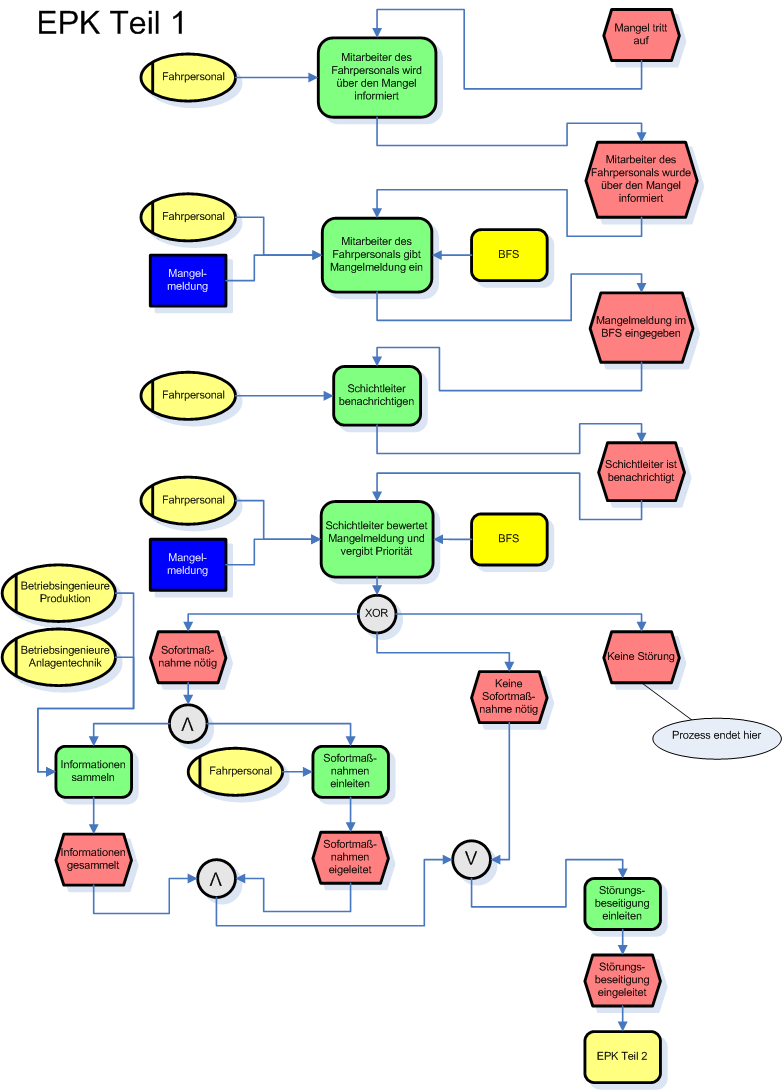
This is a large and interesting area because the process modelling already has a usage inside companies, and there is already a lot of knowledge about process modelling and data models. Companies already document workflows in external tools, and they might want those workflows to run as interactive trainings, for an example.
TinkerFlow handling of processes#
TinkerFlow always goes through the new NewtonsoftJsonProcessSerializerV4.
The default config wires it up like this:
public virtual string ProcessStreamingAssetsSubdirectory => "Processes";
public virtual IProcessSerializer Serializer => new NewtonsoftJsonProcessSerializerV4();
public IProcessAssetStrategy ProcessAssetStrategy => new SingleFileProcessAssetStrategy();
Loading is ProcessAssetManager.Load reading bytes with FileAccess.GetFileAsBytes, then SingleFileProcessAssetStrategy.GetProcessFromSerializedData calling serializer.ProcessFromByteArray.
Import from a path (ProcessAssetManager.Import(path, serializer)) uses the same call.
The V4 serializer is named "Newtonsoft Json Importer v4" and checks $serializerVersion first
So old VR Builder files still load.
On save, ProcessToByteArray wraps the process in a ProcessWrapper, flattens nested subchapters into top level Steps and SubChapters lists, replaces transition targets and subchapter steps with StepRef objects holding only the Guid, adds "$serializerVersion": 4, and returns UTF8 bytes. GetProcess() resolves the refs back by GUID.
You can see this in the Demo - Core Features files and the converted TinkerFlow process and the old process structure share the same ProcessWrapper with Process, Steps, and SubChapters.
Assembly names change from VRBuilder.Core and mscorlib to TinkerFlow-Debug and System.Private.CoreLib:
E.G.:
"$type": "VRBuilder.Core.Serialization.NewtonsoftJsonProcessSerializerV4+ProcessWrapper, TinkerFlow-Debug"And unresolvable Unity types survive as BrokenBehavior with Error and RawJson kept, for example, a PlayAudioBehavior whose AudioData was VRBuilder.Core.TextToSpeech.TextToSpeechAudio.
For now this is stable enough and easy expandable for each refactoring to support more and more Behaviors and Conditions.
Import and Export#
The current state of process import/export exporting from VRBuilder to TinkerFlow works for what we have implemented.
Not every Behavior is covered simply because we have not built those yet (they are outside the current project scope) and because those other behaviors still rely on unique namespaces and .NET type signatures that would cause issues.
We can already map and import Steps, Chapters, and Transitions.
That is already a big milestone, because figuring out the process structure is the real heavy lifting.
Adding missing Behaviors and Conditions later is manageable.
Completing this import path is a major step for the project since it is one of the main features we promised long ago.
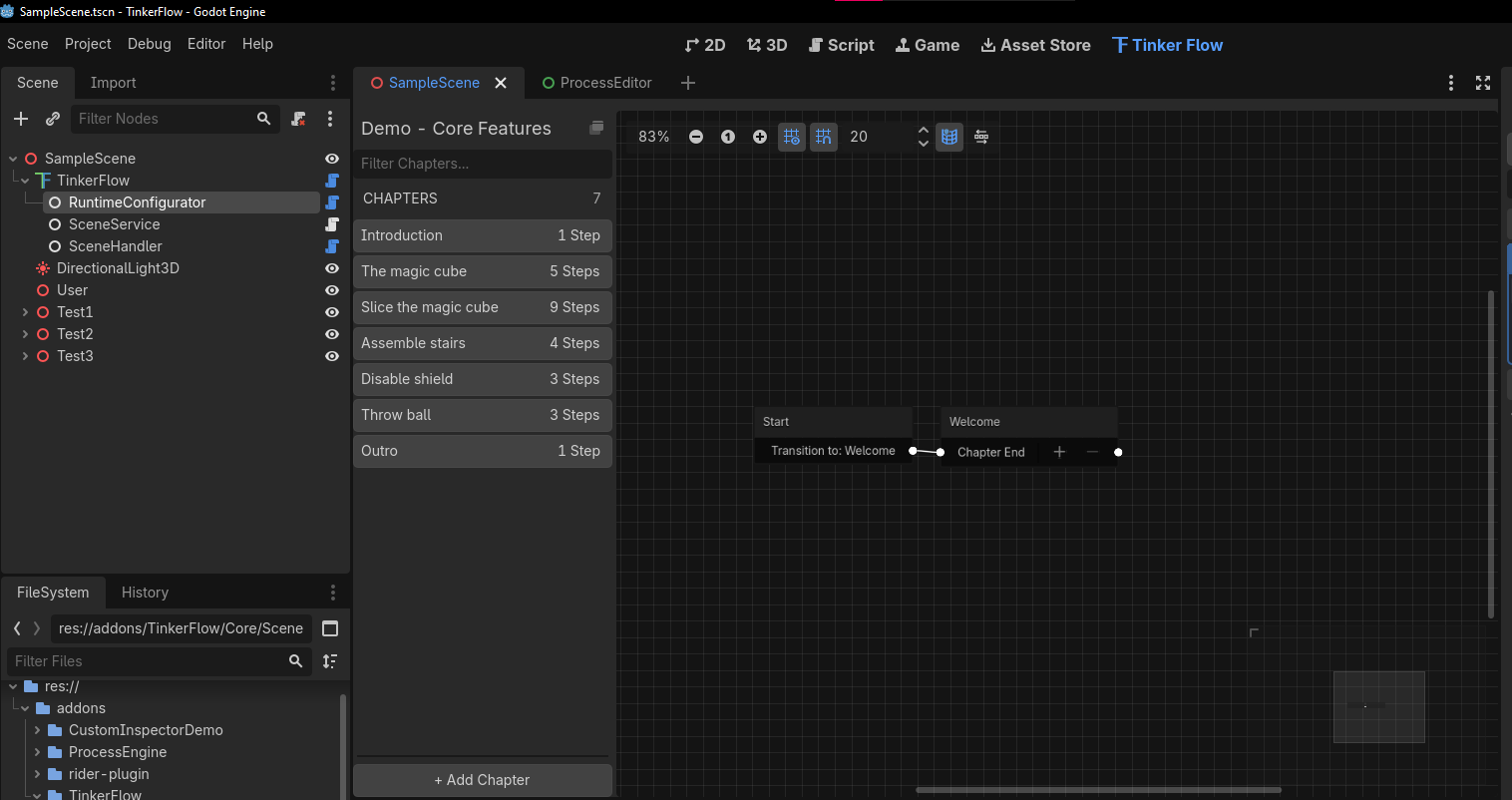
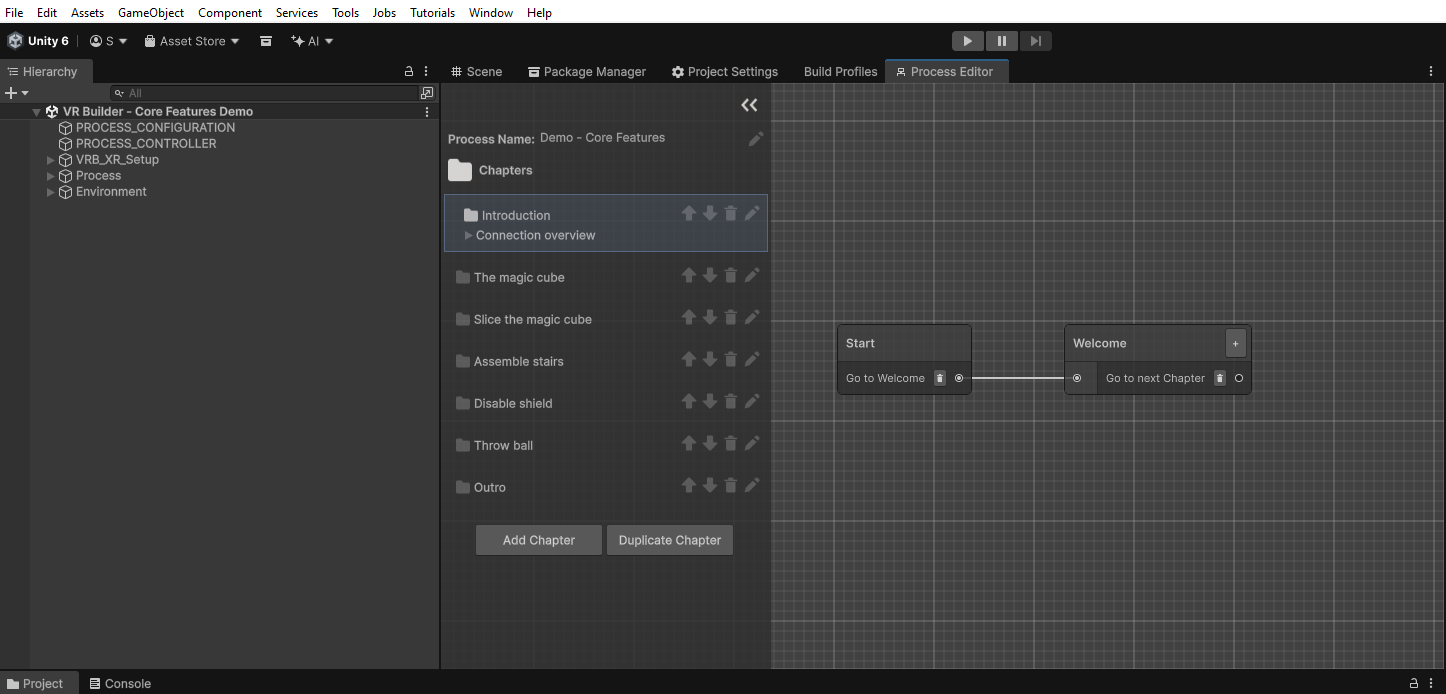
We are staying in close touch with the MindPort team and talking about future synchronization around processes and overall architecture, because that affects TinkerFlow core runtime. There has also been some agreement on how the process structure looks as a JSON file. MindPort will not support it for now, because it is still a large product used by other companies, so they are not going to roll out this kind of import overnight. We understand and accept that!
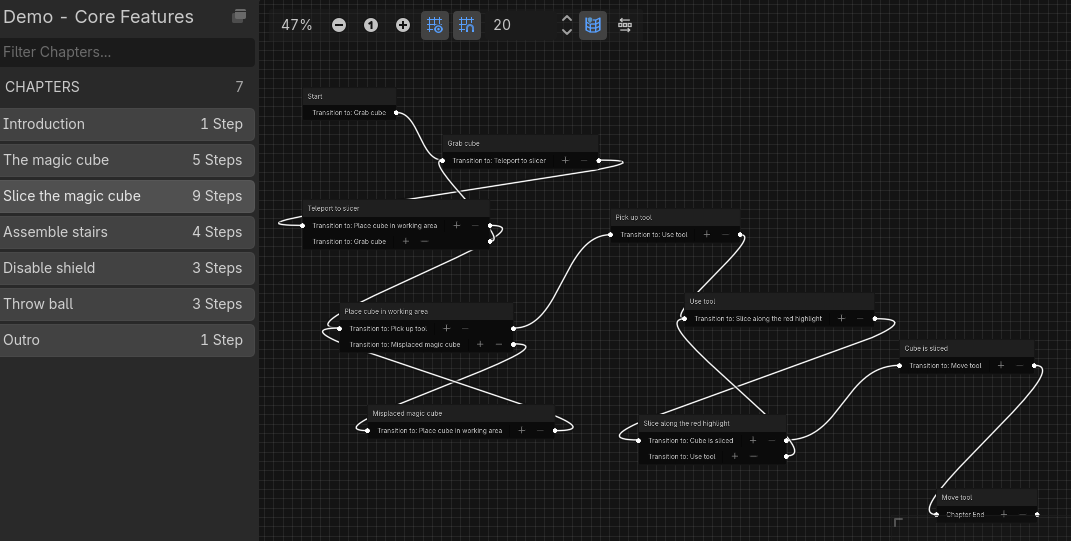
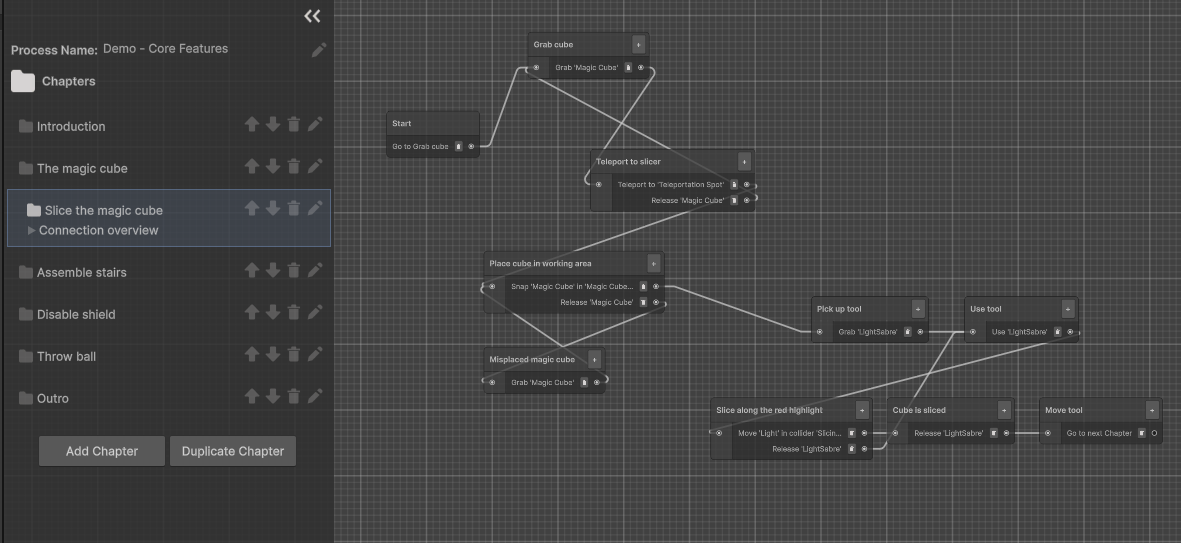
Currently, VRBuilder can import our processes back into VRBuilder. The big version jump from VRBuilder 5 to 6 will likely be what brings that functionality the ability for us to import TinkerFlow processes there. But that is not a problem for us, we will keep working in the meantime, and if it turns out we converge on a different format like TOML, we should still have time to finish everything before VRBuilder releases.
I am pretty confident about that.
Thanks for reading, and feel free to check out the other blog posts. If you have ideas on how processes or process structures could be represented or stored better, hit us up feedback is welcome. See you next time.