
The scene structure of Unity and Godot have discrepancies and needed more thinking about how we access objects in the scene and the components of those scene objects.
TinkerFlow’s NodeExtensions solves these discrepancies between our system and VR Builder.
The Godot implementation makes sense for how we think and handle objects in the scene.
The Component System#
ProcessEngine (VR Builder Core) started on Unity with a typical Unity scene and GameObject structure.
Its main types ISceneObject, ISceneObjectProperty, behaviors, conditions all assume a component object where multiple behaviors attach to a single GameObject.
A MoveProperty sits alongside a Rigidbody and a MeshRenderer.
The engine queries them with GetComponent<T>().
Godot works differently.
A Node holds one script.
If there are multiple behaviors on one logical object with several components required, child nodes need to be added.
TinkerFlow maps this by making ProcessSceneObject a direct child node of the logical Node and treating each property as a direct child of the ProcessSceneObject.
Door can have sub-elements each with own ProcessSceneObject:
Door(Node3D) -> ProcessSceneObject(Node) -> MoveProperty
Door(Node3D) -> ProcessSceneObject(Node) -> TestProperty
Door(Node3D) -> Knob -> ProcessSceneObject(Node) -> TestProperty
@startuml
tinkerflow-theme

package "Runtime Composition" {
    component "Door" as FRAME <<Node3D>>
    () "ProcessSceneObject" as PSO <<ProcessSceneObject>>
    FRAME -down-> PSO
    PSO -down-> "MoveProperty"
    PSO -down-> "ModifyParentProperty"
    PSO -down-> "SnapableProperty"
    FRAME -down-> "CollisionShape3D"
    FRAME -down-> "Knob"
    () "ProcessSceneObject" as PSO2 <<ProcessSceneObject>>
    "Knob" -down-> PSO2
    PSO2 -down-> "TestProperty"
}

@enduml
ProcessSceneObject.Properties returns direct children filtered by type via GetChildren().OfType<ISceneObjectProperty>().
CheckHasProperty and GetProperty use the same scan, and each property sets SceneObject = (ISceneObject)GetParent().
Display servers over Nodes?#
We also thought about using the Godot display server to handle the rendering and the components. We would have more control on a way lower level of the engine, but the abstraction layer is wrong here and also a weaker compatibility with Unity. If a ECS’s (Entity Component System, like Fennecs) is something that would fit to TinkerFlow alter then we also would consider it. (Fennecs is a nice tooling for ECS!)
However, Godot servers (DisplayServer, RenderingServer, PhysicsServer3D) are low-level engine APIs for hardware/media interaction, so not something suitable for us. TinkerFlow operates at the application layer, so where users interact with the scene inside Godot. We do want to touch rendering or audio pipelines directly (yet).
NodeExtensions API#
NodeExtensions provides static methods for child lookup via GetChildren().
GetNode<T>() returns the first child matching type or path.
GetNodeOrNull<T>() returns null when no direct child matches.
HasNode<T>() checks for a child. GetOrAddNode<T>() returns the direct child or creates it, parents it, and sets Owner so the editor tracks it correctly.
SceneObjectExtensions.Node() returns GetParent().
FixIt uses parent.GetOrAddNode<ProcessSceneObject>().
Runtime lookup uses node.GetNodeOrNull<ProcessSceneObject>() with no recursive search.
One extension class to rule them all:
NodeExtensions= “my direct children” Godot native
Editor Time Validation#
Unity’s [RequireComponent] enforces same-GameObject coexistence at edit time.
TinkerFlow ports this to the sibling model.
The attribute (/TinkerFlow/Core/Runtime/Godot/Attributes/RequireComponentAttribute):
[AttributeUsage(AttributeTargets.Class, AllowMultiple = true)]
public class RequireComponentAttribute : Attribute
{
    public Type type0 { get; }
    public RequireComponentAttribute(Type requiredType) => type0 = requiredType;
}
The validator (RequireComponentValidator) is a [Tool] autoload that runs only in the editor:
public override void _Ready()
{
    if (!Engine.IsEditorHint()) { QueueFree(); return; }
    CallDeferred(nameof(ValidateScene));
}

private void ValidateScene()
{
    var sceneRoot = EditorInterface.Singleton.GetEditedSceneRoot();
    if (sceneRoot == null) return;
    foreach (var child in sceneRoot.FindChildren("*"))
        TryCreateRequiredSiblings(child);
}

private void TryCreateRequiredSiblings(Node node)
{
    var attrs = node.GetType().GetCustomAttributes(typeof(RequireComponentAttribute), true);
    foreach (RequireComponentAttribute attr in attrs)
    {
        var parent = node.GetParent();
        if (parent != null) AddMissingSibling(parent, node, attr.type0);
    }
}
AddMissingSibling checks whether a sibling of the required type already exists under the same parent.
If not, it instantiates the type, names it after the type, calls parent.AddChild() so it becomes a sibling under the same parent, and sets Owner = parent.Owner ?? parent.
Missing dependencies appear before you hit Play, with a log entry:
[RequireComponentValidator] Created missing 'MoveProperty' sibling on 'Door'The validator removes itself in exported builds because of the Engine.IsEditorHint() check.
This can be used inside the Editor to just have one button to fix all missing dependencies (components).
Example Components#
Examples of how the new component system is used for behaviors and properties.
MoveProperty Needs a Path3D PSO Child#
BezierSplinePathProperty needs a Path3D PSO child for spline data to know where and how to move this object:
// BezierSplinePathProperty
// Direct child lookup, no recursive search
Path ??= this.GetNodeOrNull<Path3D>();
GetNodeOrNull<Path3D>() finds the direct child.
This is the Godot get-child equivalent of Unity’s GetComponent<Path3D>() on the same GameObject.
EffectProperty Uses Interface-Based Lookup#
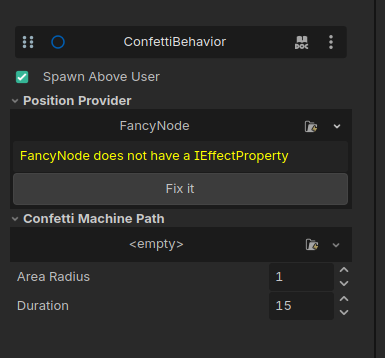
EffectProperty activates confetti and particle effects via IParticleMachine:
// EffectProperty
// Direct child lookup via GetChildren scan
if (confettiMachine.GetNodeOrNull<IParticleMachine>() == null) { ... }
particleMachine = confettiMachine.GetNodeOrNull<IParticleMachine>();
Interface-based lookup enables multiple particle machine implementations, such as CPU, GPU, and custom, without changing the property code.
confetti behaviorProcessSceneObject.GetProperty() Direct Child Scan#
The ISceneObject.GetProperty<T>() implementation uses a direct child scan:
// ProcessSceneObject
// Direct children only via GetChildren
public T GetProperty<T>() where T : ISceneObjectProperty
{
    var property = GetChildren().OfType<T>().FirstOrDefault();
    if (property == null) throw new PropertyNotFoundException(this, typeof(T));
    return property;
}
Exact types and interfaces both resolve through OfType<T>() on direct children.
This handles both concrete types (MoveProperty) and interfaces (IMoveProperty) uniformly.
Godot-Specific Pain Points#
Generics with a Node base mean every component lookup goes through OfType<T>() or as T casts.
NodeExtensions centralizes that boilerplate in GetNode, GetNodeOrNull, HasNode, and GetOrAddNode so property code does not repeat it.
Components (PSO child) cannot be Resources, because resources do not participate in the scene tree, and there is no _Ready, _Process, signals, or FindChildren discovery, which makes validation difficult and may lead to corrupt data if the resource cannot be loaded.
%UniqueName with GetNode<T>("%Name") is used because the % syntax only works for children with unique names (% is a unique name per scene), adding the same elements leads to a lot of naming conflicts.
So it is not possible to go across scenes with it and have multiple Nodes with the same unique name inside one scene.
The letter one is the main reason why we cannot use it.
The ProcessSceneObjects are always literally named “ProcessSceneObjects” and this would collide.
Editor validation is built into Unity’s [RequireComponent].
TinkerFlow builds a custom [Tool] validator that scans FindChildren("*") at edit time.
BUT never forget the [Tool] attribute.
Godot gives no warnings if it is missing, and FindChildren("*") will not work because of this, returning nothing…
Ownership and serialization are automatic in Unity, but in Godot you have to set Owner = parent.Owner ?? parent manually, because this is how add_child works at the moment. NodeExtensions.GetOrAddNode centralizes that boilerplate so property code does not repeat it.
At the End#
The PSO-container model keeps the ProcessEngine identical across engines without being too overcomplicated. Each PSO-container handles the components of one node element. Each node element (also the children of nodes) can have its own PSO-container.
Godot developers get a Godot native direct child API via NodeExtensions, while not caring about typical unity conventions.
Unity developers porting to Godot keep their knowledge and similar functionality (without paying the runtime fee).
The RequireComponentValidator catches missing dependencies at edit time, not runtime.
Editor-time validation runs under Engine.IsEditorHint() and removes itself in builds.
It will not be used at runtime, and warnings at the cheapest time to fix (at the editor time).
Every lookup allocates an enumeration and runs OfType<T>() and will show up in the profiler as a spike (we need to improve that later).
@startuml

package "Unity Components" {
    node "GameObject Door [GameObject]" as GO {
        component "ProcessSceneObject"
        component "MoveProperty"
        component "MeshRenderer"
        ProcessSceneObject -down- MoveProperty
        MoveProperty -down- MeshRenderer
    }
}

package "TinkerFlow Components" {
    node "Node3D Door" as DOOR <<Node3D>>
    node "ProcessSceneObject" as PSO <<Node>>
    node "MoveProperty" as MPG <<Node>>
    node "ModifyParentProperty" as MPP <<Node>>
    node "CollisionShape3D" as CS3 <<Node>>
    node Knob <<Node3D>>
    node "ProcessSceneObject" as PSO2 <<Node>>
    DOOR <-down-> PSO : child-parent relation
    PSO <-down-> MPG : child-parent relation
    PSO <-down-> MPP : child-parent relation
    DOOR <-down-> CS3 : child-parent relation
    DOOR <-down-> Knob : child-parent relation
    Knob <-down-> PSO2 : child-parent relation
    PSO .> MPG: GetProperty / GetComponent
    MPG .> MPP: GetComponent
    MPP .> CS3: GetComponent
    CS3 .> MPP: GetComponent
    MPP .> MPG: GetComponent
    MPG .> PSO: GetComponent
}

@enduml
The hierarchy is a deeper parent node, ProcessSceneObject, which makes scene tree navigation more verbose and maybe more difficult.
We might hide ProcessSceneObjects and the Properties in the future with the “Internal” feature.
(Instanced scenes work naturally because owned: false includes them, which hides them from the main tree btw).
Take a look at the next blog post.