
Our first milestone is to extract VR Builder’s process runtime into a common foundation for Unity and Godot. We will explain the current status quo and will give a technical overview (so this might be a very mixed-up post).
However, before we started moving code, we analyzed how VR Builder turns a graph into a running experience. We used existing unity-based tests of VR Builder, existing applications and made diagrams out of it and try to identify potential problems and optimizations. (Jumping code execution by static classes and automatic hooking by Unity made our debug time tough…)
Maybe there is an open question: why keep VRBuilder structure instead of designing another process system from scratch? It’s easy to answer.
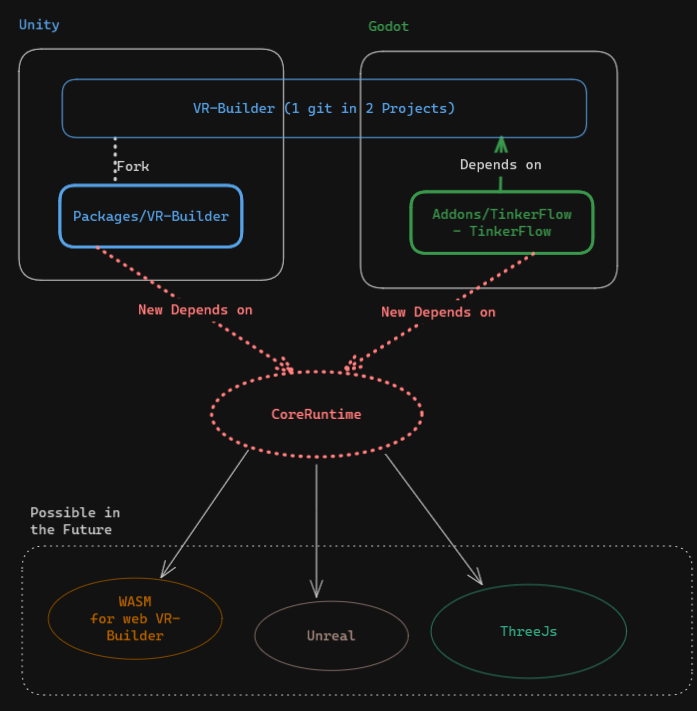
Why do we want to keep the VR Builder structure?#
A rewrite of TinkerFlow sounds like a good idea at start, but there is already a good architecture and structure where we can start from. We would throw away years of working and already solved problems.
VR Builder already provides:
- a process authoring system already used by company projects
- lifecycle rules for processes, chapters, steps, behaviors, transitions, and conditions
- serialization and stable references between process files and scene objects
- interfaces and properties for custom behaviors and conditions
- editor workflows for creating, loading, saving, and changing process graphs
Some of this is visible in interfaces like the Unity Editor or while running the application. Other parts are hidden in execution order, setup conventions, serialization details, and edge cases. Reimplementing everything could introduce regressions and leave us with two incompatible systems (like many other applications). So, using already existing and moving reusable logic into Core Runtime, and place engine-specific code behind interfaces or adapters.
Our first step is that we are looking at where process execution, serialization, editor tooling, scene setup, and Unity-specific interaction meet. The overall goal is to create a process at TinkerFlow and run it in VR Builder, or more concrete: Using the preferred engine and have a tool that works with both in both export directions. A openUSD support makes a shared scene even possible!
Important: Unity and Godot do not need to work identically, but they need to share a core via an API or base structure.
Current architecture of processes#
A VR Builder process consists of chapters and connected steps. A step runs behaviors, waits until its conditions are fulfilled, and then follows a transition to the next step. During execution, properties connect process logic such as “this object is grabbed” to objects and interaction systems in the scene.
Process logic describes how a chain of step-based connections is handled. Engine integrations deal with how a runtime scene is interacting with the process logic.
VR Builder stores step-based flow as a process graph:
- A process is the complete sequence of a flow and contains ordered chapters.
- A chapter groups one part of that sequence and points to its first step.
- A step is a node in the chapter graph.
- A behavior performs work while its step is active, for example highlighting an object or playing audio.
- A condition observes state, for example whether an object has been grabbed.
- A transition groups conditions and points to the next step.
@startuml
tinkerflow-theme

skinparam classAttributeIconSize 0

interface IProcess
interface IChapter
interface IStep
interface IBehaviorCollection
interface IBehavior
interface ITransitionCollection
interface ITransition
interface ICondition

IProcess "1" *-- "1..*" IChapter : ordered chapters
IChapter "1" *-- "0..*" IStep : directed graph
IChapter --> "0..1" IStep : first step
IStep "1" *-- "1" IBehaviorCollection
IStep "1" *-- "1" ITransitionCollection
IBehaviorCollection "1" *-- "0..*" IBehavior
ITransitionCollection "1" *-- "1..*" ITransition
ITransition "1" *-- "0..*" ICondition
ITransition --> "0..1" IStep : target
@enduml
When a step becomes active, the runtime starts its behaviors and checks its outgoing transitions. All enabled conditions in one transition must be complete before the runtime can take it. Other outgoing transitions are alternatives. A transition without a target ends the chapter.
How this looks inside Unity editor time: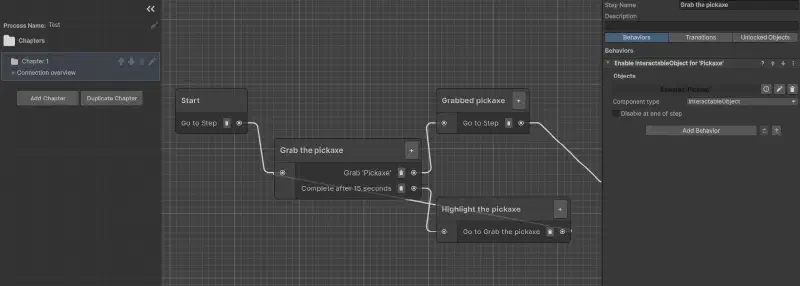
The editor creates and saves the process graph as data. The runtime reads and executes it. We want Core Runtime to own this (process engine) part.
Runtime flow#
At runtime, four parts connect the process graph to events in the scene:
- Process Engine deserializes a process definition containing GUID-backed scene-property references.
- Process controller advances process, chapter, step, behavior, transition, and condition lifecycles.
- Basic Interaction conditions read property state without depending on an XR framework. (For example, they check whether an object is grabbed through
IGrabbableProperty.IsGrabbed). - XRI property adapters update that state from XR Interaction Toolkit events on Unity components (e.g. the user with its VR Headset grabs something).
So, everything of the process editing (creating a process, adding steps, bahviors and transitions) and scene setup (adding objects or adding languages) is irrelevant for the runtime.
@startuml
tinkerflow-theme

left to right direction

rectangle "Serialized process" as Asset
rectangle "Process Engine\ncontroller with entity graph" as Engine
rectangle "Scene property reference\nGUID with interface type" as Reference
rectangle "Basic Interaction port\nIGrabbableProperty" as Port
rectangle "XRI adapter\nGrabbableProperty" as Adapter
rectangle "XRI component\nInteractableObject" as Interactable
actor User

Asset -> Engine : deserialize
Engine -> Reference : condition reads Values
Reference -> Port : registry resolves
Adapter ..|> Port
Adapter -> Interactable : subscribes to select events
User -down-> Interactable : grab input
@enduml
Take a step with the instruction “pick up the pickaxe.”
The condition reads IGrabbableProperty.IsGrabbed, but it does not know which XR framework detected the grab.
In Unity, an XRI adapter listens to selection events and updates the property.
A Godot adapter can update the same property from Godot XR events.
Process files use GUIDs to refer to scene properties instead of storing direct references to Unity objects. A runtime registry resolves those GUIDs. The process data does not depend directly on Unity’s scene objects then.
Keeping graph entities, lifecycle handling, and the whole process structure in Core Runtime is the goal then. But what’s about the engine-specific parts? We solve this by using interfaces for all engine-based interactions such as scene objects and user interaction, or atomic data types such as vector data type working. Yep, that means we have to implement scene-properties that can interact with scene objects as well as registries of services and interaction adapters per engine.
Editor flow#
The editor displays the graph, changes its entities, and saves the result. What the editor doesn’t need to know is the process runtime like running the process, but it needs to know how to serialize and deserialize the process graph and provide the UI. Unity depends on Unity-based editor APIs, GraphView with IMGUI or UITK. This means we have to write the whole Editor part for it because Godot does not have any of these dependencies, but this means also that we have a lot of freedom here.
UI actions such as creating steps, connecting transitions, and changing behavior data are part of these elements we need to implement. VR Builder’s Unity editor part uses a static application and replaceable editing strategies:
GlobalEditorHandlerreceives Unity/editor-window lifecycle eventsIEditingStrategydefines process and step editing operationsGraphViewEditingStrategyprovides legacy GraphView/IMGUI behaviorStepInspectorUITKEditingStrategyextends that strategy for UITK step viewsProcessAssetManagercoordinates serialization strategy, asset layout, files, and external-change monitoringEditorConfigurator.Instancesupplies selected editor services
@startuml
tinkerflow-theme

class GlobalEditorHandler <<static facade>>
interface IEditingStrategy
class GraphViewEditingStrategy
class StepInspectorUITKEditingStrategy
class ProcessAssetManager <<static service>>
class EditorConfigurator <<service locator>>
interface IProcessSerializer
interface IProcessAssetStrategy

GlobalEditorHandler --> IEditingStrategy : delegates editor events
GraphViewEditingStrategy ..|> IEditingStrategy
StepInspectorUITKEditingStrategy --|> GraphViewEditingStrategy
GraphViewEditingStrategy --> ProcessAssetManager : load/save/watch
ProcessAssetManager --> EditorConfigurator
EditorConfigurator --> IProcessSerializer
EditorConfigurator --> IProcessAssetStrategy
@enduml
TinkerFlow will use a Godot interface for the same process model instead of adapting Unity’s visual implementation.
We also have to maintain compatibility with the existing editor.
GlobalEditorHandler is its entry point, while ProcessAssetManager handles file layout, serialization, and external changes.
Replacing all of this at once would be risky, so we will separate these responsibilities one at a time.
Our resulting plan for refactoring#
After the short introduction of VR Builder structures, our plan is the following: We will not move everything in one big merge, but rather:
- Stabilize engine-neutral entities and lifecycle contracts in Core Runtime
- Keep serialization replaceable and verify existing process files throughout the work
- Move Unity-specific scene, editor, and XRI code behind explicit interfaces
- Implement matching Godot adapters and tooling in TinkerFlow
- Test both engines continuously so VR Builder keeps working while TinkerFlow gains features like editor tooling and UI (And trying to not be in a merge-hell)
First learnings at the beginning#
To tell also some good learnings so far. Our first idea was to use Git submodules in both projects (which was a good idea, but we may not know enough to work with it properly). Combining them with OpenUPM led to integration problems and repeated merge conflicts (Godot does not support OpenUPM btw).
We chose a separate repository for Core Runtime, integrated differently by each engine:
- Godot includes the repository inside its
addonsfolder next to TinkerFlow. - Unity includes the process engine through OpenUPM and adds this package as a requirement for VR Builder.
This gives us one shared codebase (ProcessEngine) while Unity and Godot can use their usual package structure.
If you know a better way, please let us know!
Stay updated!